Convertor

Buy/Sell

Bitcoin Wallet: What It Is, How It Works, and How to Create One

Short Answer
A Bitcoin wallet is the application or device that allows you to store, receive, and send Bitcoin. In reality, the wallet does not hold the coins — but rather the private keys that give you access to the funds recorded on the blockchain. Without the private keys, you do not control the Bitcoin.

Why do you need a Bitcoin wallet?
Bitcoin Wallet: What It Is, How It Works, and How to Create One

At Abarai, we see users buying their first Bitcoin daily. The most common question is whether they need a wallet before purchasing. The answer depends on what you want to do with the Bitcoin — but for full control over your funds, we always recommend having your own wallet.

✓ You want to buy Bitcoin and hold it yourself
✓ You want to receive Bitcoin from someone
✓ You want to send Bitcoin anytime, without approval
✓ You don’t want to rely on Binance or another exchange

What is a Bitcoin wallet?

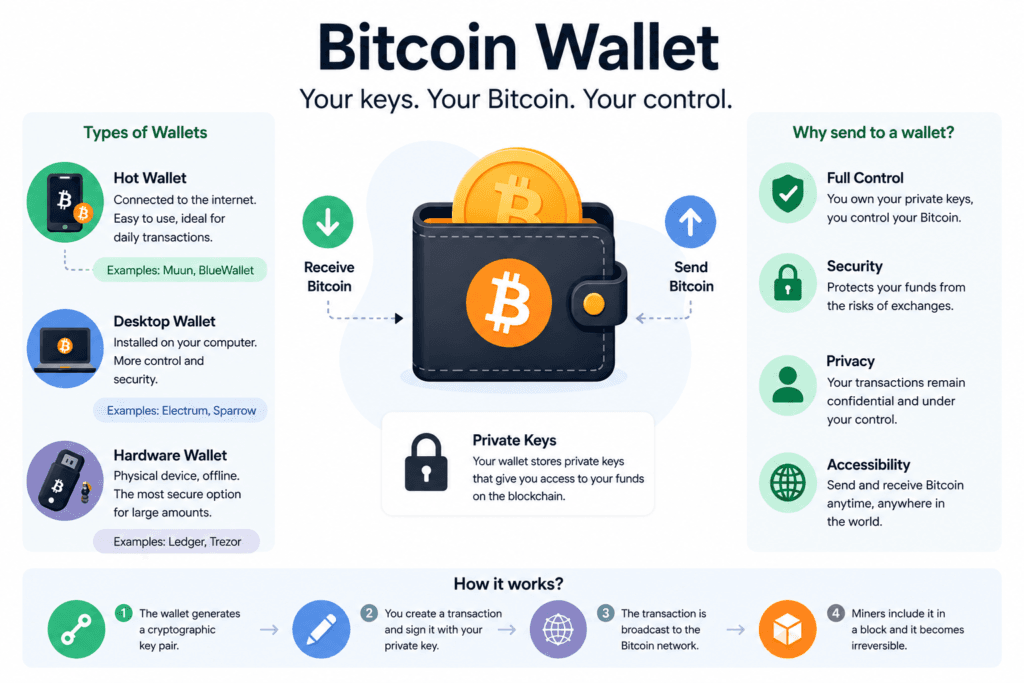
A Bitcoin wallet is a software or physical device that manages the cryptographic keys needed to access and control your funds on the blockchain. Your Bitcoin does not “sit” in the wallet — it always exists on the blockchain. The wallet keeps track of the keys with which you can prove that those funds belong to you and initiate transactions.

Think of it as a keychain: the keys are not the money, but without them, you cannot access the account. If you lose the keys, you lose access to the funds — permanently, without the possibility of recovery.

“Not your keys, not your coins” — the fundamental principle of Bitcoin. If someone else holds the private keys (e.g., an exchange), that person controls your funds, not you.

How does a Bitcoin wallet work?

Each wallet has two essential components that work together.

🔑 Private Key
A randomly generated secret number. It proves you own the funds and signs transactions. Never show it to anyone. Whoever holds the private key holds the Bitcoin.
🔓 Public Key and Address
Derived from the private key. The Bitcoin address — a string of characters like bc1q... — is what you give to others to receive funds. You can share it without risk.
Initiate a transaction
Enter the recipient’s address and amount in the wallet.
Wallet signs with the private key
Generates a unique digital signature — proof that you are the owner, without exposing the key.
Transaction is broadcasted to the network
The transaction is sent to the Bitcoin network, where miners verify the digital signature and ensure the funds can be spent.
Transaction is included in a block
A miner includes the transaction in a new block, and after confirmation, it becomes a permanent part of the Bitcoin blockchain.
What is the seed phrase?
The seed phrase (or recovery phrase) is a set of 12 or 24 words generated when creating the wallet. It represents a readable form of the private key and is the only method to recover your wallet if you lose your phone or device. Write it on paper, offline, and keep it as an important document. Never photograph it or store it digitally.

Types of Bitcoin wallets

There is no universal wallet — the choice depends on how often you trade, the amounts you hold, and how much you care about security.

TypeSecurityCostFor whom
Hardware⭐⭐⭐⭐⭐100-200 USDInvestors, large amounts, long-term storage
Mobile⭐⭐⭐⭐FreeMost users, frequent transactions
Desktop⭐⭐⭐⭐FreeDaily use, advanced control
Web⭐⭐⭐FreeBeginners, small amounts, quick access
PaperFreeAlmost useless today — risk of deterioration
🔒 Cold wallet (offline)
The private key never touches the internet. The most secure type of storage. Hardware wallets (Ledger, Trezor) are classic examples. Recommended for significant amounts.
🔥 Hot wallet (online)
Connected to the internet — convenient for frequent transactions, but more exposed to risks. Mobile and desktop wallets are hot wallets. Suitable for small amounts and daily use.

How to create a Bitcoin wallet step by step

There are dozens of wallets available. One of the simplest for beginners is Muun Wallet — free, available on Android and iOS, without complex technical setup.
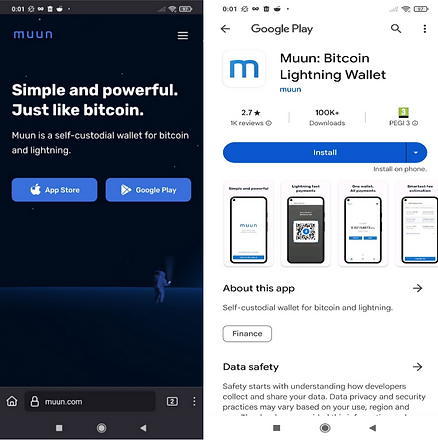
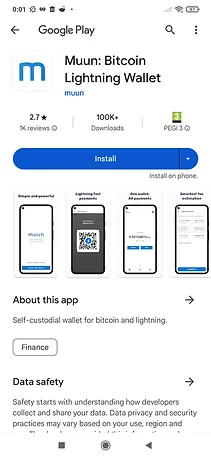
Note: Muun Wallet is not an app developed by Abarai. This guide is purely informational. For questions about the app, visit muun.com.
Step 1 — Download the app
Search for “Muun Wallet” in the App Store (iPhone) or Google Play (Android) and install the app.

Download Muun Wallet app

Step 2 — Create a new wallet
Upon opening, choose the option “Create a new wallet”.

Create a new wallet

Step 3-4 — Choose and confirm the PIN code
Set a PIN code with which you will later authenticate in the app. Confirm the code entered in step 3.

Confirm the PIN code

Step 5 — Your wallet is ready
Now you can receive and send Bitcoin. You will see the Receive and Send buttons on the main screen.

Bitcoin wallet interface

Step 6-8 — Create the backup method (MANDATORY)
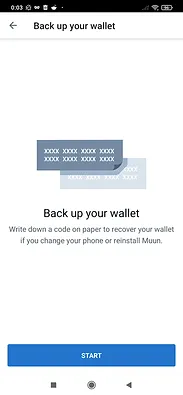
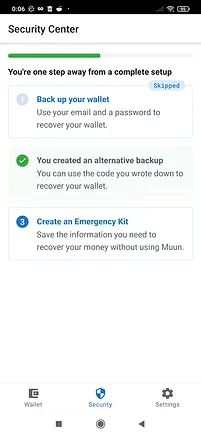
Press “Back-up your wallet”. Choose the method with keywords — not email, which is vulnerable to cyber attacks. The app will display a set of words — write them on a piece of paper in the exact order.

Create wallet backup

Step 9-10 — Confirm the words and keep the paper safe
The app will ask you to confirm a few words from the list — to verify that you have noted them correctly. The paper with the keywords should be kept as an important document, separate from the phone.

Confirm the keywords

⚠️ Golden rule for seed phrase: Do not photograph it. Do not store it in the cloud, email, or notes. Do not give it to anyone. If someone asks for your seed phrase — they are a scammer. Keep it like a birth certificate, in a safe physical place.

How to buy Bitcoin directly in your wallet

Once you have a wallet set up, the natural next step is to buy Bitcoin and send it directly to your address.

The process is simple: in Muun Wallet (or any other wallet), press Receive and copy the displayed Bitcoin address or save the QR Code. This is the address where you will receive the funds.

If you don’t already have Bitcoin, you can buy it directly in a compatible wallet through a crypto ramp — enter the amount, pay with a card, and Bitcoin goes directly to your wallet address, without additional steps.


How to receive Bitcoin in your wallet

The process is simple and takes 30 seconds.

1. Open the wallet and press “Receive”
You will see your Bitcoin address — a string of characters starting with bc1 or 1 — and a QR Code.
2. Copy the address or save the QR Code
The address is public — you can give it to anyone without risk. It is equivalent to a crypto IBAN.
3. Send the address to the person sending you Bitcoin
Once the sender confirms the transaction, Bitcoin appears in your wallet in ~15 minutes.
Each wallet can generate new addresses for each transaction — all lead to the same wallet. It is a privacy feature, not a problem. You can always use the same address if you prefer simplicity.

Best hardware wallets in 2026

If you hold significant amounts or want maximum security, a hardware wallet is the best investment. The private keys remain offline permanently — they cannot be stolen over the internet.

🥇 Ledger Nano S Plus — best value for money
Supports Bitcoin, Ethereum, and over 5,500 tokens. Small but functional screen. The best-selling hardware wallet in the world. Recommended as a first purchase if you don’t want to spend much.
🥈 Ledger Flex — touchscreen, modern design
New generation Ledger with E Ink touchscreen. Confirm transactions directly on the device’s screen — more convenient and safer. Suitable if you frequently use the hardware wallet.
🥉 Trezor Safe 5 — open-source, maximum transparency
The source code is public and verifiable by anyone — for those who prioritize complete transparency. Color touchscreen, supports Bitcoin and other major cryptocurrencies.

Bitcoin Wallet vs. Lightning Wallet

Muun Wallet supports both classic Bitcoin and the Lightning Network — a network built on top of Bitcoin that allows instant transactions with fees under $0.01.

₿ Bitcoin (on-chain)
Confirmation: ~15 minutes
Fee: variable ($0.5–$5+)
Suitable for: large amounts, storage
⚡ Lightning Network
Confirmation: instant
Fee: under $0.01
Suitable for: small, frequent payments

Muun Wallet automatically manages both types of transactions — you don’t have to choose manually. Ideal if you want to use Bitcoin for daily payments, not just storage.


Bitcoin Wallet vs. Exchange Account

Many users leave Bitcoin on the exchange after purchase — out of convenience. It is important to understand the fundamental difference.

Own walletExchange (Binance etc.)
Who holds the keysYouThe exchange
Fund controlCompleteExchange decides
Risk of fund blockingZeroPossible
Platform bankruptcy riskDoes not affect youYou can lose everything (e.g., FTX)
Instant transactionsYes, anytimeDepends on the exchange
Ease for tradingRequires withdrawalConvenient

Advantages of a self-custodial wallet

🔑 Full control over funds
You are the only one who can initiate a transaction. Private keys are stored on your device — not on a platform’s servers.
🛡️ Enhanced security
Your funds are not exposed to the risks of a centralized exchange — hacks, insolvencies, or account freezes do not affect you.
🌐 Financial independence
You can make transactions anytime, without relying on an exchange’s policies or a platform’s availability. Bitcoin operates 24/7.

Disadvantages of custodial exchange

⚠️ Security risk
Exchanges are among hackers’ favorite targets — they store large sums and present vulnerabilities. Historical hacks (Mt. Gox, FTX, Bitfinex) have cost users billions of dollars.
⚠️ Insolvency risk
If the exchange goes bankrupt, legal proceedings can take years — and you might never recover your funds. The collapse of FTX in 2022 locked billions of dollars of users’ funds.
⚠️ Withdrawal limitations
Exchanges can impose withdrawal limits, request additional documents, or freeze accounts in situations of legal or financial uncertainty. You do not control access to your own money.

Common mistakes beginners make

❌ Photograph the seed phrase
A photo can sync to the cloud, be accessed by apps, or be stolen. Write the seed phrase on paper, never digitally.
❌ Send on the wrong network
Bitcoin sent on the Ethereum or TRON network is lost. Always check that the selected network matches the one accepted by the recipient.
❌ Lose the seed phrase
Without the seed phrase, there is no recovery. There is no support to help you, no backup password. Store it in at least two different physical locations.
⚠️ Leave crypto on exchange long-term
Convenient for active trading, but risky for storage. If you are not actively trading, withdraw to your own wallet.

Frequently asked questions about Bitcoin wallets

Do I need a wallet to buy Bitcoin?
Not necessarily — you can buy and leave it on the exchange. But if you want to truly own the Bitcoin (to have the private keys), you need your own wallet. Without your own wallet, the exchange holds the funds for you.
What happens if I lose the phone with the wallet?
If you have the seed phrase noted, you can reinstall the app on any other device and fully restore the wallet. If you do not have the seed phrase, the funds are lost permanently. That is why backup is mandatory.
Can I have multiple Bitcoin wallets?
Yes, you can create as many wallets as you want. Many users use a hot wallet for frequent transactions and a cold wallet (hardware) for long-term storage.
Is Muun Wallet safe?
Muun is a non-custodial wallet — you hold the private keys. It is considered safe for small and medium amounts. For large amounts or long-term storage, a hardware wallet (Ledger, Trezor) offers a higher level of security.
How do I know my Bitcoin address?
In any wallet, press Receive (or Primește). You will see your Bitcoin address — a string of characters starting with bc1 or 1 — and a QR Code. Copy it or show the QR to receive funds.
Does the Bitcoin wallet store other cryptocurrencies?
It depends on the wallet. Muun Wallet supports Bitcoin and Lightning Network. Trust Wallet and Exodus are multi-chain wallets that support hundreds of cryptocurrencies. A hardware wallet like Ledger supports Bitcoin, Litecoin, and thousands of tokens.