How to Withdraw Money from Ledger | Step-by-Step Guide
Quick Answer
A Ledger is a hardware wallet, not an exchange. To withdraw money, simply send your crypto from Ledger to a regulated crypto ramp or exchange. Once the blockchain confirms the transaction, the platform transfers EUR or USD directly to your bank account.
Withdrawing money from a Ledger is slightly different from a mobile wallet like Trust Wallet. There is one extra step that catches most users off guard the first time: you must physically confirm every transaction on the Ledger device itself.
✓Your Ledger device — charged and accessible. You will need to physically press the buttons to confirm the transaction.
✓Ledger Live installed on your computer or phone — or a compatible third-party wallet (MetaMask, Phantom) connected to your Ledger.
✓A small balance of the network’s native token for gas fees — ETH for ERC20 transactions, TRX for TRC20, BNB for BEP20. Without this, the transaction will fail.
✓Your PIN code — you need to unlock the Ledger before every session.
Why Ledger requires physical confirmation: This is by design — the private keys never leave the device. Every outgoing transaction must be reviewed and approved on the Ledger’s screen by pressing the physical buttons. This is what makes hardware wallets significantly more secure than software wallets, but it also means you cannot initiate a transaction without the device in hand.
Methods to withdraw money from Ledger
There are three main methods. The difference is in the number of steps, speed and fees.
Method
Steps
Duration
Difficulty
Crypto ramp (Abarai or Moonpay)
4-5
1-24 hours
Simple
Exchange (Kraken, Binance)
7-9
1-3 days
Medium
P2P
4-6
Variable
High
Method 1 — Via a crypto ramp (simplest)
A crypto ramp buys crypto from you and transfers the money to your bank account or card. You send crypto from your Ledger, the platform sends you EUR or USD to your IBAN or to your credit/debit card.
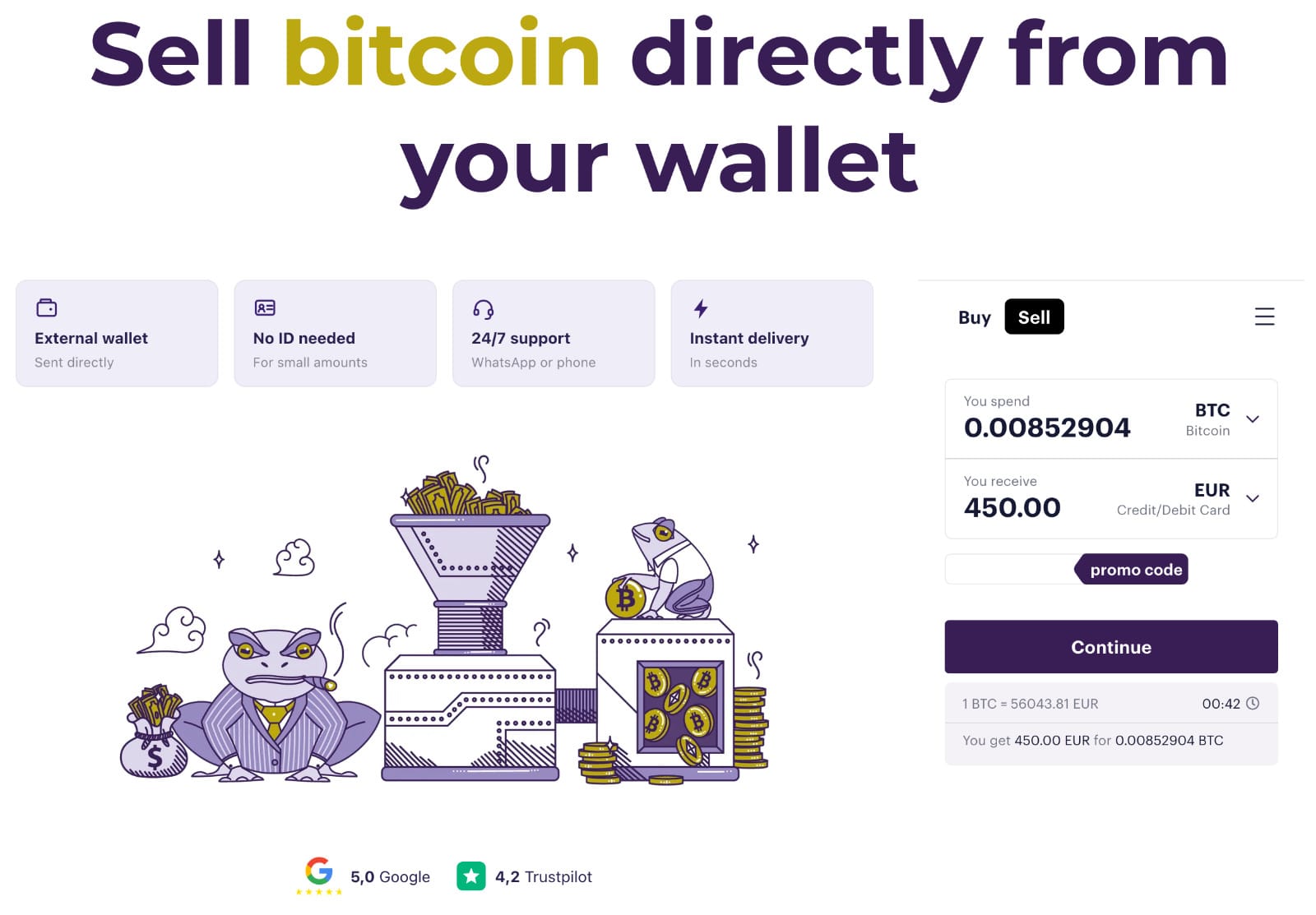
Step 1 — Enter your details on the selling platform
Select the cryptocurrency you want to sell and the amount. The platform shows you exactly how much EUR you receive, including the fee. Enter your IBAN or card details for the payout.
Selling crypto from ledger on Abarai crypto ramp
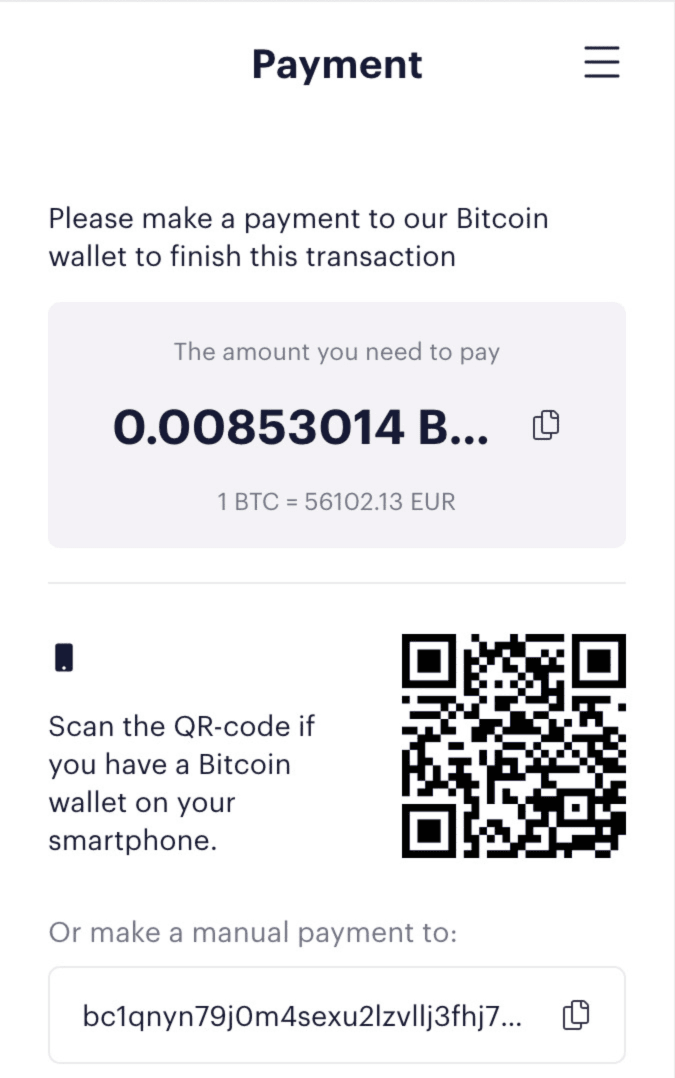
Step 2 — Copy the deposit address and check the network
The platform generates a crypto address for you to send to. Check the network — if selling USDT, confirm whether the platform wants TRC20 or ERC20. Sending on the wrong network means lost funds.
Step 3 — Connect your Ledger and open Ledger Live
Connect your Ledger device via USB or Bluetooth, enter your PIN to unlock it, and open the correct app on the device (e.g. the Bitcoin app, Ethereum app, or TRON app). Open Ledger Live on your computer or phone.
Step 4 — Initiate the send transaction
In Ledger Live, go to the relevant account and select Send. Paste the address received from the platform and set the correct network. Double-check the address — blockchain transactions are irreversible.
Make the payment on the address indicated by the platform
Step 5 — Confirm physically on your Ledger device ← this is the step most users miss
Your Ledger screen will display the transaction details — recipient address, amount and network fee. Verify these on the device screen, then press both buttons to confirm. The transaction will not broadcast until you do this. If the details look wrong, reject it on the device.
Step 6 — Receive money in your account
Once the blockchain confirms the transaction (a few minutes for most networks), the platform processes the payout. Money arrives on your card almost instantly or in your bank account within a few hours.
⚠️ Always verify on the Ledger screen — not just on your computer. Malware can alter the recipient address displayed in Ledger Live on your computer while showing the correct address on screen. The Ledger device screen is the only trusted display. If what you see on your computer differs from what the Ledger shows — reject the transaction immediately.
Method 2 — Via an exchange (Kraken, Binance)
If you trade actively or sell large volumes, an exchange gives you access to competitive rates and advanced tools. The process involves more steps compared to a ramp, but gives you full control over execution price.
Step 1
Create an account on Kraken or Binance and complete KYC verification — ID, address proof, selfie. Can take hours to days for first-time users.
Step 2
Find the deposit address for your cryptocurrency in the exchange’s Deposit section. Copy the address and note the required network.
Step 3
Connect your Ledger, open the relevant app on the device and Ledger Live on your computer. Initiate a Send to the exchange’s deposit address.
Step 4 — Confirm on Ledger
Review the transaction details on your Ledger’s screen and press both buttons to confirm. The transaction won’t proceed without this step.
Step 5
Wait for blockchain confirmations. Funds appear in your exchange account.
Step 6
Sell crypto for EUR or USD — either at market price or via a limit order at your target price.
Step 7
Withdraw to your bank account via SEPA. Duration: 1-3 business days.
Not sure whether Kraken or Binance is the right exchange for you? We’ve compared both in detail — fees, supported countries, MiCA authorization and trading features — in our Kraken vs Binance 2026 guide.
Ledger Live vs third-party wallets — what’s the difference?
You can send crypto from your Ledger using two different interfaces. Both require physical confirmation on the device — the difference is in how you initiate the transaction.
Ledger Live (official)
Ledger’s own app, available on desktop and mobile. Directly manages Bitcoin, Ethereum, Solana, and most major assets. Cleanest experience for straightforward sends.
✓ Best for: Bitcoin, Ethereum, USDT, Solana
✓ Easiest to use for beginners
Third-party wallets (MetaMask, Phantom)
Connect your Ledger to MetaMask (for Ethereum/EVM tokens) or Phantom (for Solana). The wallet provides the interface; Ledger signs and confirms the transaction. Useful for DeFi, DEX, or networks not natively supported in Ledger Live.
✓ Best for: DeFi, ERC20 tokens, Solana SPL
✗ Slightly more complex to set up
Which network to use — TRC20, ERC20, BEP20 or native
The same cryptocurrency can exist on multiple networks, and the fee you pay varies significantly. This is the most common source of errors when sending from Ledger.
⚠️ Golden rule: Always match the network shown in Ledger Live with the network the destination platform accepts. Sending USDT ERC20 to an address expecting TRC20 — or vice versa — can result in permanent loss of funds. When in doubt, ask the receiving platform before confirming on your Ledger.
What fees do you pay when withdrawing from Ledger
Two distinct fees apply to every withdrawal. Both are shown before you confirm on the device.
1. Network fee (gas)
Paid to the blockchain for processing. Paid in the network’s native token (ETH, TRX, BNB). Does not go to any platform — goes directly to validators.
2. Platform fee
Charged by the buying platform (ramp or exchange). Usually 1-3% of the amount or a spread in the exchange rate. Always shown before confirmation.
Example — sell $500 USDT TRC20
Network fee (TRC20): ~$1 (paid in TRX)
Platform fee (~3%): ~$15
Total: ~$16 You receive: ~$484 in EUR
Example – Same amount via ERC20
Network fee (ERC20): ~$15 (paid in ETH)
Platform fee (~3%): ~$15
Total: ~$30 You receive: ~$470 in EUR
Tip: For USDT transfers, TRC20 costs less in network fees than ERC20 at comparable speed. If the destination platform accepts both, always choose TRC20.
Common mistakes when withdrawing from Ledger
❌ Not opening the correct app on the Ledger device
To send Ethereum or ERC20 tokens, the Ethereum app must be open on the Ledger. To send TRON or TRC20 tokens, the TRON app must be open. If the wrong app is open, the transaction will fail or the device will not communicate with Ledger Live.
❌ Wrong network
Sending USDT TRC20 to an address expecting ERC20 — or vice versa — can result in permanent loss of funds. Always verify the network on both sides before confirming on the Ledger screen.
❌ Not enough gas token
You need a small balance of the network’s native token to pay fees. No ETH = ERC20 transaction fails. No TRX = TRC20 transaction fails. Always keep a small reserve of the relevant gas token in your Ledger.
❌ Trusting the computer screen over the Ledger screen
Malware can replace the recipient address shown in Ledger Live on your computer. The address shown on your Ledger’s physical screen is the only trustworthy source. If they don’t match — reject the transaction.
⚠️ Forgetting Memo/Tag for XRP or Stellar
Some cryptocurrencies (XRP, XLM) require a Memo or Destination Tag in addition to the address when sending to an exchange. Omitting it can result in stuck funds. Check whether the receiving platform requires a Memo before sending.
Frequently asked questions
Can I withdraw money directly from Ledger to my bank account?
Not directly. Ledger is a hardware wallet — it cannot send money to a bank account. You need to send crypto from the Ledger to a platform that buys crypto (a ramp or exchange), which then transfers the fiat equivalent to your IBAN or card.
Do I need Ledger Live to send crypto from my Ledger?
For most assets, yes — Ledger Live is the simplest interface. However, you can also use compatible third-party wallets like MetaMask (for Ethereum and EVM tokens) or Phantom (for Solana). In all cases, the Ledger device must be connected and you must confirm the transaction on the physical device.
Can I sell Bitcoin from my Ledger?
Yes. Open the Bitcoin app on your Ledger, connect to Ledger Live, and initiate a Send to the buying platform’s deposit address. Confirm the transaction on the Ledger screen. Bitcoin network fees are variable ($0.5-5+) and confirmations typically take 10-60 minutes.
Can I sell USDT directly from my Ledger?
Yes. For TRC20 USDT, open the TRON app on your Ledger and use Ledger Live or a TRON-compatible interface. For ERC20 USDT, open the Ethereum app and use Ledger Live or MetaMask connected to your Ledger. Choose TRC20 when possible — fees are significantly lower.
How long does it take to receive money after selling from Ledger?
Via a crypto ramp: 1-24 hours from blockchain confirmation. Via an exchange with SEPA bank transfer: 1-3 business days after the sale executes on the exchange.
What documents are required?
For small amounts, some platforms require only billing details. For larger amounts, identity verification is required — a photo of your ID and a selfie — under AML and MiCA regulations. This is done once per platform.
Is it safe to sell crypto from a Ledger?
Yes — hardware wallets are among the most secure ways to hold and send crypto. The key safeguard is always verifying the recipient address on the Ledger’s physical screen before confirming. Never rely solely on what your computer shows.